
Lackey is a program the Redemption community uses to play games of Redemption online. Its a lightweight software and is not as polished as other card game softwares (like MTG Arena and Hearthstone) but has more of a "Magic Online" feel. All the actions in the game are done manually, and that can feel a bit tedious to players. But I'd still recommend it, as playing Redemption online is the fastest way to improve as a player.
Playing Online Games
Once you've installed Lackey, join the Redemption Discord and navigate to the "Online Play" channel. Someone there is usually pretty willing to show newer players the ropes!
Playing Online Tournaments
Once you've installed Lackey and have found a deck you'd like to compete with, join the Redemption Discord and message @BaboonyTim and inquire about the "Lackey Grand Prix." It's an tournament that pairs players against each other on a weekly basis.
Installation
Windows OS
- Download the Windows Lackey Client
- Once downloaded, right click and hit "Extract All"
- Start up LackeyCCG
- Go to the Plugin tab, and paste the following into the "Paste AutoUpdate URL" section: https://jalstad.github.io/RedemptionLackeyCCG/RedemptionQuick/updatelist.txt
- Click the "Install or Update from URL" button to install the plugin
- Click the "Browse installed plugins to load one" button.
- (Optional): Go to preferences -> Miscellaneous -> Allow Pre-Downloading images for offline use. Go back to Plugins and click the "Download all missing card images" button.
Mac OS
- Download the MacOS Lackey Client
- Extract its contents and then put the LackeyCCG folder into your Applications folder
- (Important) Open up the terminal app and run these commands:
sudo xattr -dr com.apple.quarantine /Applications/LackeyCCGMac/LackeyCCG.app
(type in your password)
sudo xattr -dr com.apple.quarantine /Applications/LackeyCCGMac/LackeyUpdater.app - Start up LackeyCCG
- Go to the Plugin tab, and paste the following into the "Paste AutoUpdate URL" section: https://jalstad.github.io/RedemptionLackeyCCG/RedemptionQuick/updatelist.txt
- Click the "Install or Update from URL" button to install the plugin
- Click the "Browse installed plugins to load one" button.
- (Optional): Go to preferences -> Miscellaneous -> Allow Pre-Downloading images for offline use. Go back to Plugins and click the "Download all missing card images" button.
Recommended Preferences
- Disabling Sound: Go to Preferences -> Sound and click the "Uncheck to disable all sounds" option.
- Adding username: Go to Preferences -> Player Profile and type your desired name into the Player Name field.
- Adding custom profile picture:
- First, create a custom 100px by 100px .jpg file
- Then go to Preferences -> Player Profile and browse and select the custom file you created
- Adding custom background image (playmat):
- Create a jpg image (recommend specs: 1024 × 468 but you'll have to play around with it)
- Then go to Preferences -> Appearance -> Table viewing and playmat preferences and select the file you created.
- Adding Macros:
- Macros are a great way to save time and shortcut common card manipulations! Here are the ones I'd recommend. Go to Preferences -> Chat and Macros
- (Test Message 1): /draw8;/say Good Luck!:;/roll
- This one will draw 8 cards, say "Good Luck" and roll to see who goes first
- (Test Message 2): /draw3
- This draws 3 cards
- (Test Message 3): /draw2
- This draws 2 cards
- (Test Message 4): /draw1
- This draws 1 card
- (Test Message 5): /vp1pt7
- This looks at the top 7 cards of your deck
- (Test Message 6): /vp1pt6
- This looks at the top 6 cards of your deck
- (Test Message 7): /vp1pt3
- This looks at the top 3 cards of your deck
- (Test Message 8): /vp1pt2
- This looks at the top 2 cards of your deck
- (Test Message 9): /vp1pt1
- This looks at the top 1 card of your deck
- (Test Message 10): /spawn Lost Soul Token "Lost Souls" [Proverbs 2:16-17]
- This creates a lost soul token that is super useful
- (Test Message 11): /spawn Stricken Reminder Token
- Useful if you play Stricken
- (Test Message 12): /spawn Heavenly Host Token
- Useful if you play The Heavenly Host
- (Test Message 12): /spawn Lost Soul Token "Harvest" [John 4:35]
- Useful if you play "Harvest" lost soul
- (Test Message 1): /draw8;/say Good Luck!:;/roll
- Macros are a great way to save time and shortcut common card manipulations! Here are the ones I'd recommend. Go to Preferences -> Chat and Macros
- Greymode: if you think the default Lackey color scheme is a little to white and bright, try out this "greymode" file. Download the file and go to Preferences -> Skins -> Load texture image file.
FAQs
Question: How do I resolve this error when trying to startup Lackey on Windows?
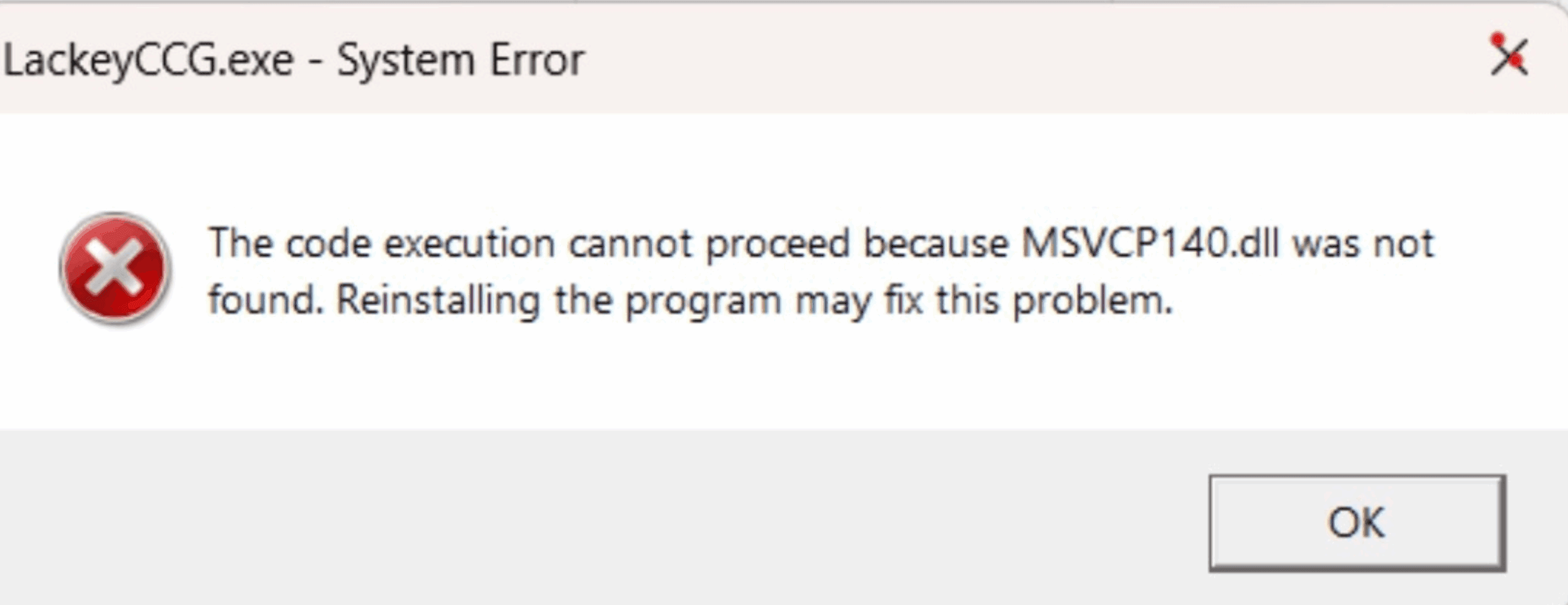
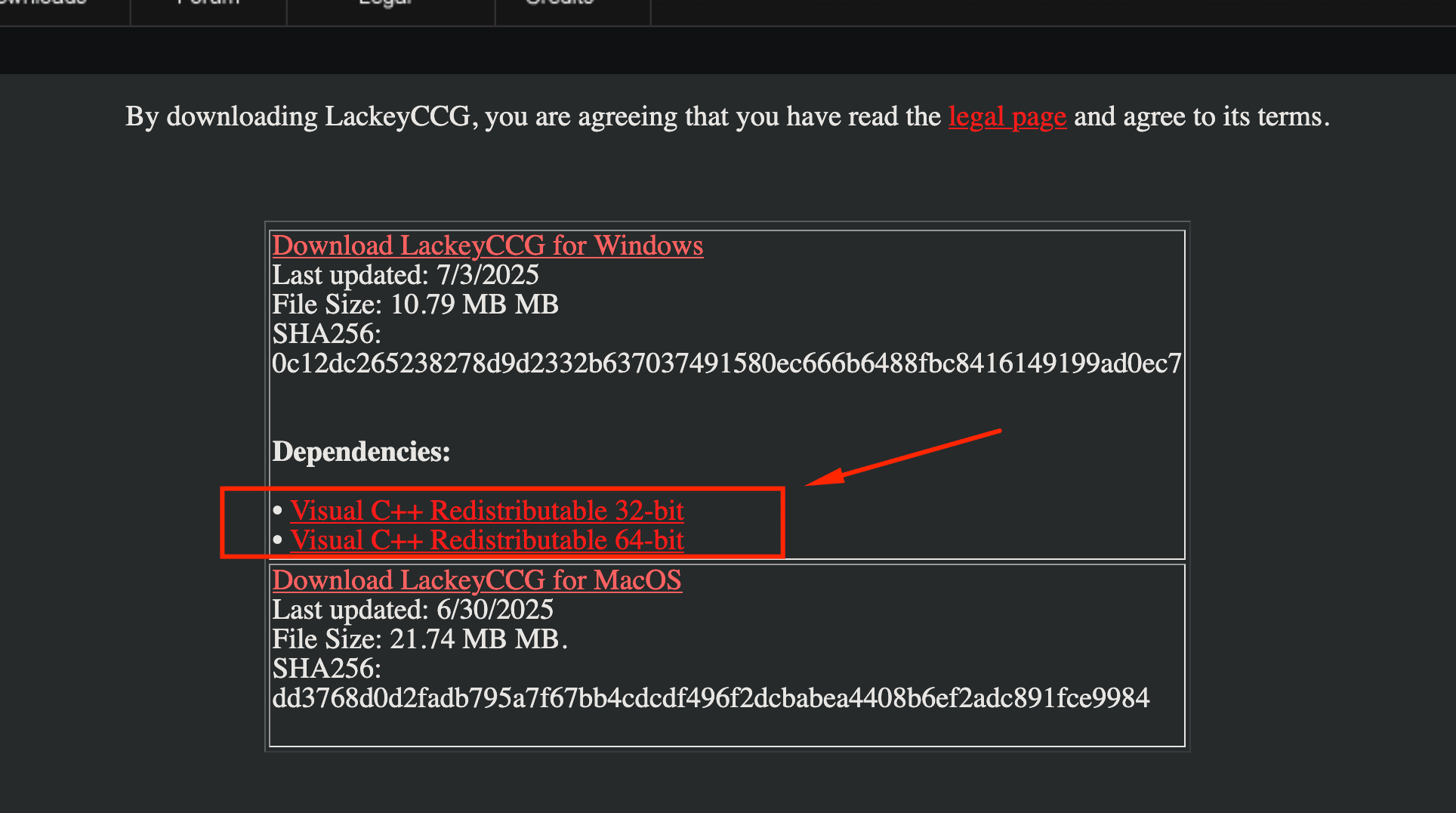
Answer: Go to the lackey downloads and download the Visual C++ dependency onto your computer.
- How do I download all card images at once?
- Go to preferences -> Miscellaneous -> Allow Pre-Downloading images for offline use. Go back to Plugins and click the "Download all missing card images" button.
- How do I disable the annoying sounds?
- Go Preferences -> Sound and click the "Uncheck to disable all sounds" option.
- I'm running MacOS and its saying Lackey can't start because it "cannot be verified"!
- This is an issue with Apple's quarantine preventing Lackey from starting. Make sure Lackey is in your Applications folder, open up Terminal and run this command: xattr -dr com.apple.quarantine /Applications/LackeyCCGMac/LackeyCCG.app
- I'm running MacOS and its saying Lackey can't start because "Lackey is damaged and can't be opened."
- This is also an issue with Apple's quarantine preventing Lackey from starting. Make sure Lackey is in your Applications folder, open up Terminal and run this command: xattr -dr com.apple.quarantine /Applications/LackeyCCGMac/LackeyCCG.app
- I'm having problems running Lackey in Windows!
- Try installing Lackey in a folder outside of your Program Files folder.
- Why can't I see the chat macros?
- Go to the "Plus" mark next to Log in the game tab and click to reveal the chat macros.
- How can I use the LackeyUpdater on mac?
- You need to download the latest version of Lackey for Mac, then run the sudo xattr -dr com.apple.quarantine /Applications/LackeyCCGMac/LackeyUpdater.app command. After that, launch the LackeyUpdater.app and you'll be able to download versions automatically with that tool.
To buy singles, sealed product, and other gaming supplies mentioned, please visit our sponsors!